Integrating Pumpkin Font into Your Seasonal Design Workflow
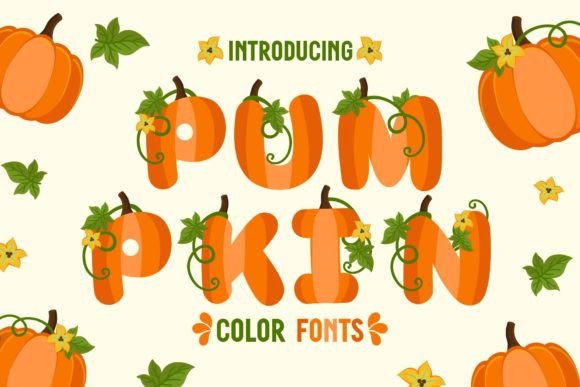
In the lifecycle of a seasonal marketing campaign or creative project, typography is rarely just an afterthought; it is a foundational element that dictates the tone and emotional resonance of the final product. For professionals and creators targeting the autumn quarter, the selection of typeface is particularly critical. This is where Pumpkin Font enters the workflow. As a specialized OpenType-SVG color font, it is engineered specifically to evoke the atmosphere of fall. It is designed to deliver the tactile impression of autumn leaves, harvest textures, and the specific color palettes associated with the season, making it a strategic asset for anyone working on Thanksgiving, Halloween, or general autumnal themes.
Understanding the technical nature of Pumpkin Font is the first step in successful implementation. Unlike standard vector fonts that rely on flat color fills or outlines, Pumpkin Font utilizes the OpenType-SVG format. This technology allows the font to contain high-resolution, rasterized images or textures within the vector container. The result is a typeface that maintains the authentic, textured feel of hand-lettered paint or ink without requiring complex layering or clipping masks in your design software. This distinction is vital for workflow efficiency. It removes the step of "beveling," "embossing," or manually adding texture to text, allowing the creator to type their message and have the aesthetic applied automatically.
Strategic Application in Project Planning
When planning a project timeline for seasonal assets—whether for a small business, a freelance client, or personal stationery—the font choice influences the entire production schedule. Because Pumpkin Font provides a pre-rendered, high-quality aesthetic, it significantly reduces the time spent on post-processing. For a project manager or business owner, this means assets can be produced faster without sacrificing the "handmade" quality that consumers often look for in holiday goods.
The font fits best into the ideation and execution phases of a creative brief. During the ideation phase, designers can immediately visualize the final output because the font renders the actual texture of the design, rather than a placeholder. During execution, the font acts as a standalone design element. It is particularly effective for:
- Invitations: Creating distinct, high-impact headers for wedding or party invitations.
- Stationary Art: Developing notebook covers, planner stickers, or printables.
- Social Media: Producing eye-catching graphics for Instagram or Pinterest where scroll-stopping power is essential.
- Greeting Cards: Designing retail-ready cards with an authentic, artistic flair.
Technical Integration and Compatibility
A practical implementation of any font requires a clear understanding of its technical constraints and compatibility. Pumpkin Font is delivered in formats compatible with major desktop design software, specifically Adobe Photoshop, Adobe Illustrator, Silhouette Studio, and Inkscape. This compatibility list is crucial for workflow planning. Users of these platforms can simply install the font via their operating system and access it through the standard type tool.
However, a critical point of quality control and decision-making involves understanding where this font cannot be used. The product notes explicitly state that the OTF and TTF files are not compatible with Cricut Design Space. This is a common friction point in the crafting workflow. Cricut machines generally require standard vector paths to create cut lines, and they do not support the embedded raster data found in OpenType-SVG fonts. Attempting to force this font into a Cricut workflow will result in errors or missing glyphs.
Therefore, the integration strategy must account for this limitation. If your final output involves cutting machines, the recommended workflow is to use the font in a compatible editor like Silhouette Studio or Adobe Illustrator to create a flattened image (such as a PNG or JPG) of the text. You can then import that image into your cutting software as a "Print then Cut" project. This adds a step to the process but preserves the font's integrity while allowing you to use the design on physical products like stickers or decals.
Optimizing the Creative Process
For the independent creator or freelancer, efficiency is a currency. Pumpkin Font is designed to optimize the creative process by serving as a complete display solution. When using the font, you bypass the need for complex vector manipulation. In Adobe Illustrator, for example, you can treat the text as a standard font layer, adjusting the tracking, kerning, and leading as you would with any other typeface, while the color and texture remain embedded.
One practical tip for maintaining consistency across a campaign is to pair Pumpkin Font with a clean, sans-serif body font. Because Pumpkin is a display font with high visual density, it is best reserved for headlines, sub-headers, or call-to-action buttons. Using it for large blocks of body text can hinder readability. A workflow that utilizes a hierarchy—using Pumpkin for the "hook" and a neutral font for the details—ensures that the autumn aesthetic is present without overwhelming the viewer.
Furthermore, consider the long-term use of this asset. Because it is specific to a season, it is unlikely to be used year-round. Organizing your font library to group seasonal assets can help keep your workspace uncluttered. When the season approaches, activating or installing these specific fonts ensures your system resources are managed effectively, particularly if you are working on a machine with limited memory, as SVG fonts can sometimes carry slightly larger file sizes than standard vector fonts.
Quality Control and Final Output
Before finalizing any project using Pumpkin Font, a review of the rendering is necessary. Because the font relies on raster data embedded in the file, scaling the text up or down drastically can sometimes affect the perceived resolution of the texture. While the font is designed to remain crisp at standard display sizes, extreme enlargements for large-format printing (such as banners) should be tested first.
Additionally, color management is handled differently with SVG fonts. The color is part of the font file itself. While this limits the ability to change the color of the text in some software without rasterizing the layer first, it ensures that the specific autumnal palette—the oranges, browns, and creams—is consistent and accurate. If you need to change the color of the texture, the standard workflow in Illustrator or Photoshop would be to convert the text to outlines or a smart object and apply a clipping mask or color overlay, though this removes the "live text" editing capability.
Ultimately, Pumpkin Font is a specialized tool for a specific seasonal workflow. By respecting its technical boundaries—specifically regarding Cricut compatibility—and leveraging its pre-styled aesthetic, creators can significantly streamline the production of autumn-themed content. It transforms the typography phase from a labor-intensive styling task into a simple act of typing, allowing the creator to focus on the broader layout and messaging of their project.