Designing with Emotion: A Practical Workflow for Using the Sweet Heart Font
Understanding the Sweet Heart Font in Your Design Toolkit
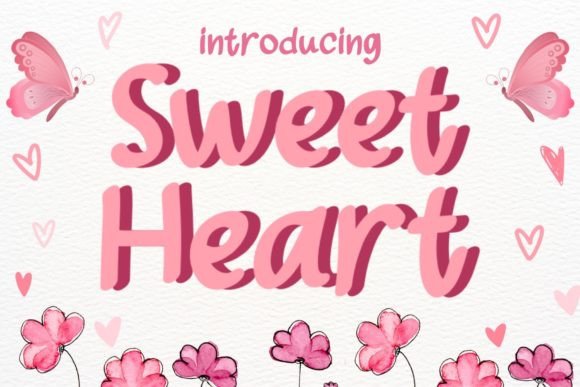
In the world of design, typography is often the bridge between a message and the emotion it evokes. The Sweet Heart Font is not just a collection of glyphs; it is a specific tool designed to convey warmth, affection, and playfulness. For professionals, freelancers, and creators, understanding where a script font like this fits into a broader production workflow is essential. It is a display typeface, meaning it is crafted for impact rather than readability in long-form text. Its value lies in its ability to instantly set a romantic or whimsical tone, making it a strategic asset for specific projects rather than a general-purpose workhorse.
When planning a project, categorizing your assets by function helps streamline execution. Sweet Heart Font falls into the category of "decorative" or "accent" typography. It is the perfect choice for those looking for a font that combines sweetness and playfulness. This font is perfect for any design that needs a touch of love and romance. Use it for wedding invitations, Valentine’s Day cards, or any other project that needs a little bit of sweetness. However, its application goes beyond these obvious use cases. It can be used to soften a corporate identity for a family-oriented brand, add a personal touch to a blog, or create eye-catching headers for a bakery’s menu.
Pre-Implementation: Planning and Compatibility Checks
Before integrating the Sweet Heart Font into your workflow, preparation is key. This involves more than just downloading the file. A practical process begins with a compatibility check. Ensure the font file format (often .OTF or .TTF) is compatible with your primary design software, whether it is Adobe Creative Suite, Canva, Procreate, or a website builder like WordPress. For web projects, checking for a web font version or a license that permits web embedding is a critical step in quality control.
Next, consider the context of your project. A common mistake in design implementation is using a script font like Sweet Heart for body text, which hinders readability. During the planning phase, pair it with a clean, sans-serif or serif font for secondary information. For example, if you are designing a wedding invitation, Sweet Heart might be used for the couple's names, while a classic serif font like Garamond or a modern sans-serif like Montserrat handles the date, time, and venue details. This contrast creates a visual hierarchy that guides the viewer’s eye and maintains clarity.
Workflow Integration: From Concept to Execution
Integrating a specialized font into your creative process requires a structured approach. Here is how to think about using Sweet Heart Font at different stages of a design project:
- Ideation and Mood Boarding: In the initial brainstorming phase, use Sweet Heart to establish the emotional tone of your mood board. Seeing the font alongside color palettes and imagery can help you and your team quickly validate whether the project’s direction aligns with a sweet, romantic, or playful aesthetic.
- Drafting and Prototyping: When creating initial drafts, use the font for key headlines or call-to-action elements. This allows you to test its visual weight and balance against other design components early in the process, saving time on revisions later.
- Final Production and Export: In the final stages, pay close attention to kerning (the space between letters). Script fonts like Sweet Heart often have specific letter connections that may require manual adjustment to look seamless. Before exporting, convert the font to outlines if sending to a printer to avoid file compatibility issues.
Practical Application Across Different Platforms
The utility of the Sweet Heart Font extends across various platforms and mediums, each with its own set of considerations. For digital creators, particularly those using design tools like Canva or Adobe Express, the font can be uploaded and used to create consistent branding materials. A small business owner, for instance, could use it to design cohesive social media posts for a Valentine’s Day promotion, ensuring the font is used consistently across Instagram stories, Facebook ads, and email headers to build brand recognition.
For those involved in physical product creation, such as stationery or apparel, the workflow involves different steps. After designing with Sweet Heart on screen, the next phase is preparing the file for print or production. This might involve creating a high-resolution PDF or an SVG file for cutting machines. Understanding the technical requirements of your production partner—whether it is a local print shop or a print-on-demand service—is a crucial part of the implementation process. Always request a proof to check how the delicate curves of the font render in the final product.
Long-Term Use and Brand Consistency
For entrepreneurs and marketers, a font is more than a design choice; it is part of a brand’s voice. If you decide to incorporate Sweet Heart Font into your brand identity, document its usage in a simple style guide. Specify which contexts it should be used in (e.g., hero sections, promotional graphics) and which it should not (e.g., legal disclaimers, lengthy product descriptions). This ensures consistency whether you are creating the content yourself or handing it off to a team member or freelancer.
Furthermore, think about the longevity of your designs. Trends in typography come and go, but a well-chosen font can have a long shelf life if applied thoughtfully. The Sweet Heart Font, with its classic script appeal, can remain relevant for years in specific niches like event planning, gift shops, or lifestyle blogging. The key is to use it as an accent to support your message, not as the entire message itself. This strategic approach helps maintain a professional and timeless quality in your visual communications.
Troubleshooting and Optimization Tips
Even with a smooth workflow, you may encounter challenges. A common issue with script fonts is their performance on digital screens, especially at smaller sizes. If the Sweet Heart Font appears blurry or hard to read on a website, consider increasing the font size or using it only for larger headings. For body text, always fall back to a highly legible font. This is a critical step in user experience (UX) design, ensuring your content is accessible to all readers.
Another practical tip involves file organization. As you accumulate fonts for various projects, maintaining a well-organized font library is a productivity habit that pays dividends. Create a dedicated folder for script fonts like Sweet Heart, and consider using a font management tool to activate and deactivate fonts as needed. This prevents software slowdowns and keeps your system running efficiently, which is especially important for designers and creators who work with large files and multiple applications simultaneously.
Conclusion: Making Sweet Heart Font Work for You
Ultimately, the Sweet Heart Font is a versatile tool for adding a specific emotional layer to your work. Its successful integration depends on a thoughtful process that considers compatibility, context, and consistency. By planning its use, pairing it wisely with other typefaces, and adapting its application to different mediums, you can leverage this font to enhance your projects effectively. Whether you are a freelancer crafting a client’s wedding suite, a marketer designing a seasonal campaign, or a hobbyist creating personalized gifts, the key is to treat the font as a deliberate choice within your larger creative workflow. This approach ensures that your designs are not only beautiful but also professional, coherent, and aligned with your project’s goals.