Magnify Font: A Detailed Look at This Geometric Sans Serif Family
For designers and creatives who appreciate the timeless appeal of clean, modern typography, the geometric sans serif category holds a special place. It’s a style defined by simplicity, clarity, and a distinctly structured aesthetic. The Magnify Font family enters this space as a carefully crafted offering, born from a deep appreciation for the genre. Inspired by iconic designs like Paul Renner's Futura from 1927, the creator of Magnify spent a long time dreaming of and developing a typeface that captures the essence of geometric simplicity while introducing its own subtle character. This article provides a balanced examination of the Magnify font, exploring its design philosophy, technical features, and practical applications to help you determine if it’s the right fit for your projects.
The Design Philosophy: Familiar Yet Distinct
At first glance, Magnify Font presents the hallmarks of a classic geometric sans serif. The letterforms are built on clean, geometric shapes, emphasizing circles, squares, and triangles. This results in a typeface that feels inherently modern, orderly, and highly legible. It avoids the organic, hand-drawn nuances of humanist sans serifs, opting instead for a more mathematical and objective visual rhythm. This makes it a strong candidate for projects where clarity and a contemporary feel are paramount.
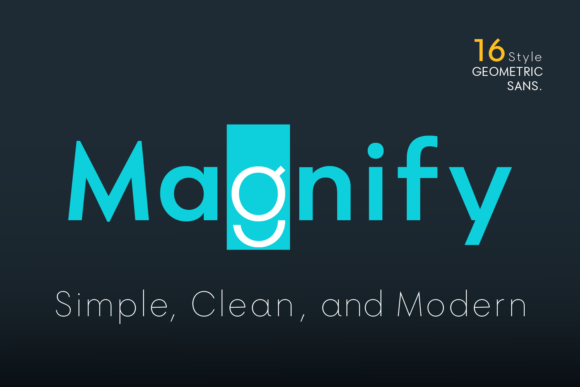
However, a closer inspection reveals a key distinction that sets Magnify apart from more rigidly geometric counterparts. The structure and element shapes are not perfectly circular. Instead, the designer opted for a slightly oval form, a subtle deviation that softens the overall appearance without sacrificing the core geometric principles. This characteristic is most evident in the uppercase letters O, G, C, and Q, as well as in the lowercase o, a, c, and e. This slight ovality can be a significant advantage. In large display settings, perfectly circular letters can sometimes feel static or mechanical. The oval forms in Magnify introduce a gentle dynamism, making headlines and logos feel more approachable and less sterile. For body text, this subtle variation can contribute to improved readability by creating a more natural flow for the eye to follow across a line of text.
Exploring the Magnify Font Family: Weights and Alternates
A typeface's utility is often defined by the breadth of its family. The Magnify Font offers a respectable range of 8 weights, stretching from the delicate Hairline to a substantial Bold. Each weight has a corresponding Oblique version, providing a total of 16 styles. This spectrum allows for significant typographic hierarchy within a single design system. You can use the Hairline or Thin weights for elegant, airy subtitles, a Regular or Medium weight for comfortable body copy, and a Semi-Bold or Bold weight for impactful headlines and calls to action.
Beyond the weight variations, Magnify includes a set of special alternate characters. The letters a, g, y, and o have alternate forms available. This is a valuable feature for designers seeking greater creative control. For example, the default single-story 'a' is common in geometric sans serifs, but an alternate double-story 'a' can lend a slightly more traditional or formal tone to a paragraph. Similarly, different forms of 'g' can dramatically alter the personality of a text block. These alternates allow you to customize the font's appearance to better match a specific brand voice or design concept, offering a way to create a different look for a paragraph, headline, or display design without switching to an entirely new typeface.
Practical Applications and Best-Fit Scenarios
Understanding where a font excels is crucial for making an informed choice. Magnify's clean lines and structured forms make it particularly well-suited for specific applications.
- Branding and Logo Design: The modern, clean aesthetic is ideal for tech startups, architectural firms, and lifestyle brands that want to project an image of sophistication and forward-thinking design. The alternate characters provide an extra layer of customization for creating unique wordmarks.
- User Interface (UI) and Web Design: Legibility at small sizes is critical for UI. Magnify's clear letterforms and wide range of weights make it a strong candidate for app interfaces, website navigation, and dashboard text, where both readability and a modern look are required.
- Editorial and Magazine Layouts: The font family's versatility allows it to handle everything from elegant subheadings in a fashion magazine to clear, readable captions in a technical journal. The contrast between the Hairline and Bold weights is particularly effective for creating dynamic layouts.
- Poster and Display Typography: The slightly oval character shapes give large-scale text a unique personality that avoids the sometimes cold feel of other geometric fonts, making it engaging for posters, signage, and event graphics.
Comparing Magnify: Tradeoffs and Considerations
When evaluating Magnify, it's helpful to consider how it fits within the broader landscape of geometric sans serifs. While it draws inspiration from classics, its specific characteristics define its strengths and limitations.
One of its primary strengths is the balance between geometric purity and subtle softness. Fonts that adhere strictly to perfect circles and squares can sometimes feel impersonal. Magnify's oval forms offer a touch of warmth, making it more versatile for projects that need to feel both modern and human-centric. The inclusion of obliques and alternates also gives it a practical edge for complex design systems.
A potential tradeoff to consider is its weight range. While 8 weights are sufficient for many projects, some extensive corporate branding systems might require an even wider spectrum, such as condensed or extended versions, which are not part of the current Magnify family. Designers working on projects that demand extreme typographic flexibility might need to look at more expansive super-families, though they may sacrifice the specific aesthetic character of Magnify in the process.
Another consideration is the specific style of its alternates. The effectiveness of the alternate characters is subjective and project-dependent. It is always recommended to test these alternates in context to see if they align with your design goals. For some, they may be the perfect solution; for others, the default characters may be preferable.
Making the Decision: Is Magnify the Right Choice?
Choosing a typeface is a decision that hinges on context, audience, and project goals. Magnify Font is likely an excellent choice if your project demands a modern, clean, and highly legible geometric sans serif with a touch of approachable character. Its feature set is robust enough for most professional design applications, from digital interfaces to print media.
However, if your work requires a typeface with a vast, multi-width family for a massive corporate identity system, or if you need a font with a distinctly warmer, more humanist feel, you may need to explore other options. The ideal approach is to test the font in your specific environment. Set sample paragraphs, create mock-up headlines, and experiment with the weights and alternates. See how it pairs with other fonts in your palette, such as a serif for body text or a slab serif for impact.
Ultimately, the Magnify Font family presents a compelling option within the geometric sans serif category. Its thoughtful design details, practical feature set, and balanced aesthetic make it a valuable tool for designers seeking clarity and modern style with a subtle, distinctive edge. By understanding its strengths and considering your project's unique requirements, you can make a well-informed decision about whether Magnify is the right typographic voice for your next creative endeavor.